Docs
Review species
Checklists/New/Validate
Review the merged species list before committing to it: filter by family or source, switch between list and chart views, and see the taxonomic composition at a glance.

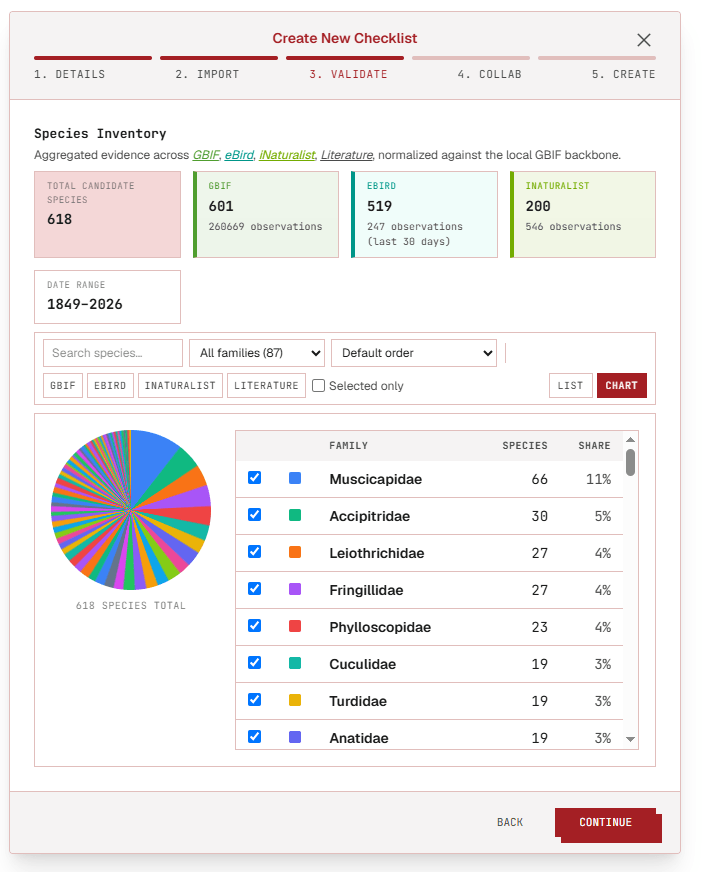
Click a step below to see it highlighted in the screenshot.
- 1
Overview
See every species pulled into the checklist so far, merged from all sources — field data, GBIF, eBird, iNaturalist, and literature — into one list.
- 2
Pie chart or table
Switch between a family-breakdown pie chart and a filterable table, and filter either view by source to see what each one contributed.
Verify each species
- Resolve synonyms in one click: correct or confirm a name straight from the row, and Checklist Hub checks it against the GBIF backbone as you type. If the name matches one already in the checklist, saving merges the two rows automatically. See Features → Workbench for how merging works.
- Verify the evidence: every occurrence claim has a map and a source count behind it, one click away. See Features → Evidence.
- Raise anything unclear by pinging a collaborator right on that species' discussion thread instead of a separate email chain. See Features → Collaboration.
- Once every species carries a decision (accepted, rejected, or merged), the checklist is ready to move forward.